

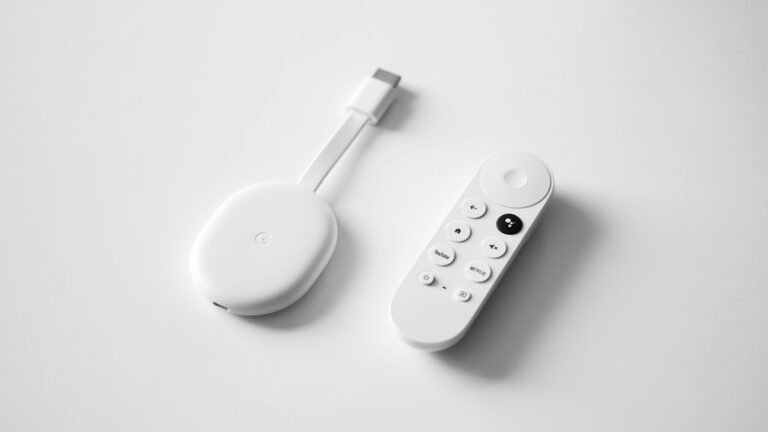
Start with the LED, not the batteries. Google’s diagnostic for a dead Chromecast or Google TV Streamer Voice Remote takes two seconds: pull both batteries, put them back while watching the small unmarked light on the front, and see whether it flashes twice. That flash means the remote has power and the fault is elsewhere. No flash means it does not — and pairing, resets and rebooting the streamer are all wasted effort until it does.
From Troubleshoot the Chromecast or Google TV Voice Remote, in order:
- Reinsert both batteries while watching the LED. No double flash → next step.
- “Complete within 2 seconds: While checking the LED, remove and reinsert the battery.”
- Swap in the batteries the remote shipped with, or “2 fresh 1.5 volt AAA batteries.”
- Remove both batteries and wait 5 minutes, then reinsert while watching for the flash.
Two details matter there. Google specifies 1.5 volt AAA; rechargeable NiMH cells are nominally 1.2 V, a common reason a remote misbehaves on “fresh” batteries. And the five-minute wait is not padding — it is the difference between the battery-out procedure working and appearing to do nothing.
The remote talks over Bluetooth. Line of sight is irrelevant.
Advice to “ensure there’s a clear line of sight between your remote and the TV” is backwards for the thing people are actually trying to fix. Google’s Chromecast & Google TV Streamer specifications list the Chromecast Voice Remote as:
BLE      2.4GHz to RF transceiver compatible with BLE 4.2
IR LED   To control TV, receiver, or soundbar
Navigation, the D-pad and the microphone all go over Bluetooth. The IR emitter has one job — your TV, receiver or soundbar’s power, volume and input. Google draws the same line: “If the remote can navigate around the TV, but can’t turn the TV on and off or control the volume, then it’s probably an IR issue.” So dead volume buttons are a config screen, not a battery: Settings → Remotes & Accessories → Set up remote buttons, pick your device, reconfigure Volume, Power or Input. A remote that does nothing at all is not an IR problem, and pointing it more carefully will not help.
A “Bluetooth range, typically up to 30 feet” is not from Google either. What Google documents, under Voice Remote responds slowly, is interference: “Move the Wi-Fi access point away from the streaming device,” “Use an HDMI extension cable to move the streaming device away from other HDMI cables,” “Move the position of the streaming device, then flip it over.” 2.4 GHz Bluetooth sharing a few centimetres with a 2.4 GHz access point is the real failure, not distance.
Back + Home for 3 seconds is pairing, not a reset
Holding the Back and Home buttons simultaneously for three seconds is not a reset. In Google’s documentation it is the pairing action, used after a reset: “If the remote didn’t pair automatically, press and hold the Back and Home buttons for 3 seconds.”
The factory reset differs by remote, and this is where a page written for one hardware generation quietly breaks:
Chromecast Voice Remote — “Remove both batteries and wait 5 minutes. Reinsert the batteries while pressing and holding the Home button… When the light starts to pulse, release the button.”
Google TV Streamer Voice Remote — a completely different gesture. “Press and hold the Mute and Center (Select) buttons at the same time… Keep holding the buttons until the LED turns solid white.” Google adds: “It usually takes no more than 12 seconds to initiate a factory reset.”
Google’s help centre now splits into three product sections — “Google TV”, “Google TV Streamer” and “Chromecast” — and the battery-and-Home method does nothing on the newer remote. Check which box is behind your TV before following any reset instructions, including these.
Google has you unpair first — with your phone as a virtual remote, Settings → Remotes & Accessories → Voice Remote → Forget — and to re-pair afterwards, “press the reset button on the streaming device to enter the pairing screen.”
Two claims I could not find anywhere in Google’s documentation
That a solid white light means “the remote might be undergoing a firmware update. Wait at least 15 minutes.” And that remote firmware updates arrive “when the remote is connected to Wi-Fi.” The remote has no Wi-Fi radio — see the spec block above — and Google’s specifications page says: “Your Google streaming devices automatically install over-the-air (OTA) updates when they are available.” The device updates over the network; the remote is a Bluetooth accessory hanging off it. “15 minutes”, “30 feet” and “line of sight” appear zero times on either Google page.
If the remote really is dead, Google lists the Google TV Streamer Voice Remote as compatible with both “Google TV Streamer (4K)” and “Chromecast with Google TV” — a straight replacement for a first-generation one, rather than a reason to replace the whole box.
What I could not test: I have no Chromecast, no Google TV Streamer and no Voice Remote. I did not watch an LED flash, hold a button, or pair anything. Every quotation above comes from support.google.com.
